On this page
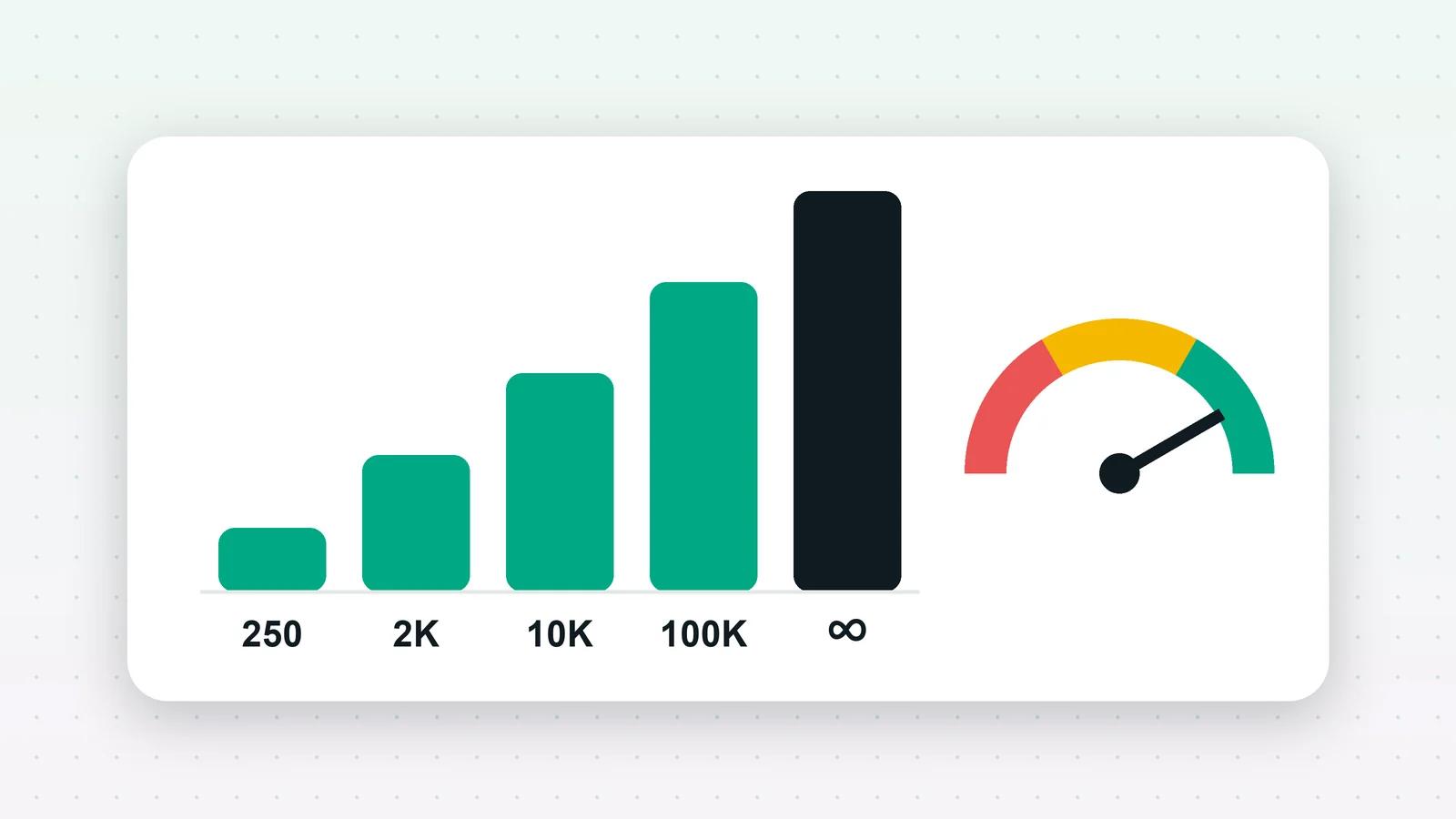
Your messaging limit is the number of different people your business can deliver messages to outside a customer service window in a moving 24 hours. New businesses start at 250. Meta raises the limit step by step, to 2,000, 10,000, 100,000 and then unlimited, once your business is verified and you send good-quality messages that use at least half of your current limit. Your quality rating is how Meta judges those messages from the way people react to them, and a poor rating can hold your limit back or bring it down.
What does the messaging limit count?
In Meta’s words, messaging limits are “the maximum number of unique WhatsApp user phone numbers your business can deliver messages to, outside of a customer service window, within a moving 24-hour period”. Three things follow from that:
- It counts people, not messages. Sending three templates to the same person in a day uses one place.
- It counts only messages outside a customer service window, which in practice means templates that start or restart a conversation. Replies to someone who messaged you in the last 24 hours do not count.
- It applies to your business portfolio, shared across all the phone numbers in it, not to each number separately.
The tiers
| Limit | Unique people per moving 24 hours |
|---|---|
| Starting limit | 250 |
| Next | 2,000 |
| Then | 10,000 |
| Then | 100,000 |
| Top | Unlimited |
How do you get from 250 to 2,000?
Meta lists three ways. Any one of them is enough:
- 1Complete Business Verification for your business portfolio in Meta Business Manager.
- 2Complete partner-led verification, where your provider verifies the business with Meta.
- 3Send 2,000 delivered messages outside customer service windows to unique people within 30 days, using templates with a high quality rating.
For most businesses in India, business verification is the practical route. Start it early, because Meta’s review runs on Meta’s timetable.
How does the limit keep rising?
After that, Meta scales the limit automatically. If your messages across all your numbers and templates are of high quality, and you have used at least half of your current limit in the last seven days, Meta raises your portfolio’s limit by one level, within six hours of meeting the criteria.
So the limit grows with use. A business that sends to 50 new people a week will not reach 10,000 however good its messages are.
What is the quality rating?
Meta rates each phone number’s quality from how people have received your messages recently. Blocks and reports weigh most. WhatsApp Manager shows it as High, Medium or Low (green, yellow and red); see Meta’s help article on quality ratings.
A number whose quality falls can be flagged. If quality recovers, the flag lifts; if it does not, Meta can lower the messaging limit. Templates are rated as well: Meta can pause or disable an approved template that recipients keep blocking or reporting.
How to keep quality high
- Message people who asked to hear from you, and honour opt-outs straight away.
- Send fewer, more relevant marketing messages. Frequency is what drives blocks, and Meta also limits how many marketing messages one person receives (error 131049).
- Use the honest template category. Utility for real order and booking updates, marketing for promotions.
- Make it easy to stop, with a clear opt-out in marketing templates.
- Watch the rating after every campaign, not once a month.
The whole routine for campaigns is in how to send bulk WhatsApp messages without getting banned.
How Fliok shows your limits and quality
- Settings shows each number’s quality, how many new people it can reach a day, and its send rate. A number capped at 250 or below, or limited by Meta, gets a warning that says what raises the limit.
- The Home page shows each number’s quality, limit and display name status at a glance.
- Alerts. Fliok notifies you when a number’s quality drops to yellow or red, or Meta reduces its limit, using Meta’s own webhook, and checks every number’s standing with Meta every hour.
- Before a broadcast, Fliok warns you when a number can reach fewer people today than the campaign is aimed at.
- After a broadcast, analytics (Pro) groups failures by Meta’s reason, so you can tell a quality problem from a bad list.
Fliok does not change Meta’s limits; it makes sure you see them before you plan a campaign around them.
Note: Meta’s rules here are from its documentation as read on 4 October 2026. Meta changes them from time to time; if anything here disagrees with Meta’s current pages, Meta is right.
Written by the Fliok team
The team that builds the product. Plain explanations of Meta's rules and of what Fliok does with them.
Try it on your own number
The Free plan connects one WhatsApp number, with no time limit. Questions first? A person replies within one business day.